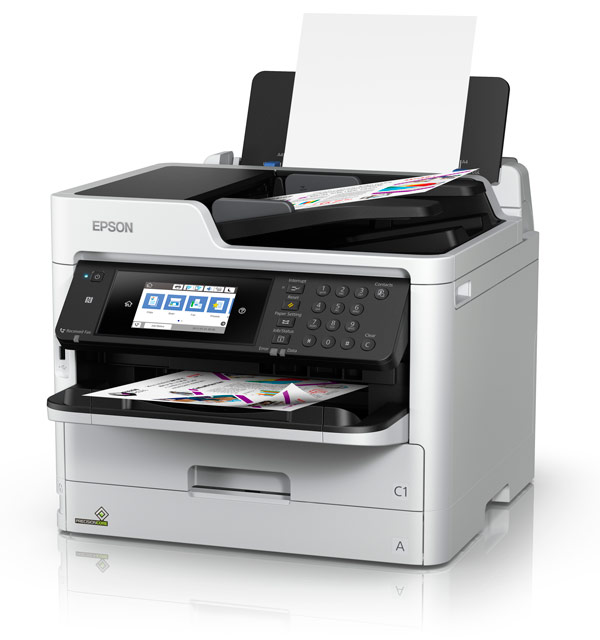
Epson WorkForce Pro WF-C5790 Support

Attention: Your operating system may not be detected correctly. It is important that you manually select your Operating System from above to ensure you are viewing compatible content.
Epson WorkForce Pro WF-C5790 Support
Downloads

Downloads

User Manuals
Administrator's Guide
01 May 2018
4.16 MB
WF-C5790_AG.pdf
Epson Device USB Agent - For use with Epson Device Admin
12 July 2022
917.09 KB
ed_usb_agent_setup_guide_npd6269_01_en.pdf
Additional information:
For use with Epson Device Admin
Download
Epson Device USB Agent - For use with Epson Remote Services
29 January 2024
414.44 KB
USB_Agent_InstallationG_npd7339-00_en.pdf
Additional information:
For use with Epson Remote Services
Download
Epson Device USB Agent - Security White Paper
29 January 2024
328.41 KB
ED_USB_Agent_Security_White_Paper.pdf
Epson Device USB Agent - Setup Guide
12 July 2022
969.27 KB
Epson Device USB Agent SG.pdf
Additional information:
For use with Epson Device Admin
Download
Start Here
01 May 2018
Start Here
01 May 2018
User's Guide
01 May 2018
Tech Tips
checking & Adjusting Quality
16 June 2022
Creating Contacts
16 June 2022
Epson Document Capture Pro:#1 Basic Scanning
13 December 2021
Epson Document Capture Pro:#2 Creating Searchable PDFs
22 March 2022
Epson Document Capture Pro:#3 Scanning to E-mail, FTP Servers, and Epson Printers
22 March 2022
Epson Document Capture Pro:#4 Scanning to WebDAV, SharePoint, Evernote, Google Drive & SugarSync
22 March 2022
Epson Document Capture Pro:#5 Creating Scan Jobs and One Touch Job Scanning
22 March 2022
Epson Document Capture Pro:#6 Switching Between Simple and Standard Views
22 March 2022
Epson Document Capture Pro:#7 Selecting Detailed Scan and Save Settings
22 March 2022
Epson Document Capture Pro:#8 Adding Destinations to Document Capture Pro
22 March 2022
General Tips
03 April 2020
Additional information:
General connectivity and troubleshooting tips for your printer.
Download
Installing ink & Loading Paper
22 March 2022
Print Quality Troubleshooting
11 September 2020
99.68 KB
Tech Tip - Print Quality Troubleshooting.pdf
Additional information:
For troubleshooting print qualilty issues on single function and multi-function inkjet printers.
View
Scanner Troubleshooting
11 September 2020
127.88 KB
Tech Tip - Scanning Troubleshooting.pdf
Additional information:
Common scanner troubleshooting for multi-function printers.
View
Unboxing & Assembly
22 March 2022
Manuals & Documentation

Manuals and docs

User Manuals
Administrator's Guide
01 May 2018
4.16 MB
WF-C5790_AG.pdf
Epson Device USB Agent - For use with Epson Device Admin
12 July 2022
917.09 KB
ed_usb_agent_setup_guide_npd6269_01_en.pdf
Additional information:
For use with Epson Device Admin
Download
Epson Device USB Agent - For use with Epson Remote Services
29 January 2024
414.44 KB
USB_Agent_InstallationG_npd7339-00_en.pdf
Additional information:
For use with Epson Remote Services
Download
Epson Device USB Agent - Security White Paper
29 January 2024
328.41 KB
ED_USB_Agent_Security_White_Paper.pdf
Epson Device USB Agent - Setup Guide
12 July 2022
969.27 KB
Epson Device USB Agent SG.pdf
Additional information:
For use with Epson Device Admin
Download
Start Here
01 May 2018
Start Here
01 May 2018
User's Guide
01 May 2018
Installation Instructions

Registration and warranty options

Set up your product
Open setup page
Registration & Warranty Options

Registration and warranty options

Register your product
To register your new product, click the Register now button.
Register now
CoverPlus
Protect your Epson product beyond the standard warranty period with an Epson CoverPlus plan. Find out more about our extended warranty options for your new product.
View CoverPlus options
FAQs

FAQs

ICC Profiles
Notes: The profiles provided below are in addition to the profiles that are built into your printer drivers. Please check your printer drivers as the built in media profiles are not displayed below.

ICC profiles

Material Safety Data Sheets

Safety data sheets

MSDS (Material Safety Data Sheet)
C13T936192 902 Black
08 February 2023
T9361_en_40.pdf
C13T936292 902 Cyan
08 February 2023
T9362_en_30.pdf
C13T936392 902 Magenta
08 February 2023
T9363_en_30.pdf
C13T936492 902 Yellow
08 February 2023
T9364_en_30.pdf
C13T937192 902XL Black
08 February 2023
T9371_en_40.pdf
C13T937292 902XL Cyan
08 February 2023
T9372_en_30.pdf
C13T937392 902XL Magenta
08 February 2023
T9373_en_30.pdf
C13T937492 902XL Yellow
08 February 2023
T9374_en_30.pdf
C13T938192 902XXL Black
08 February 2023
T9381_en_40.pdf
Videos

Videos

Contact us

Contact us

Contact us
If you have any technical queries or need general assistance, please fill out the form and our team will get back to you shortly.
Customer support form
Call centre hours:
Mon – Fri 9:00am – 10:00pm NZST
Sat – Sun 11:00am – 8:00pm NZST
FREE phone support* call: 0800 237 766
*Note Epson does not charge for telephone support.